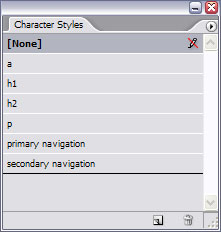
 In recent months, I have started using Adobe InDesign to create page layouts for websites. No, not to create the actual layout in a Dreamweaver or in a hand-coding sense, but as a tool for sharing design concepts and creative ideas with clients. InDesign offers effective design control (in an Illustrator-sense) to make it a nifty tool for laying out visuals to show clients. Through InDesign, I can create layout concepts which can then be exported as a PDF to share with clients.
I have found this particularly helpful when designing large, database-driven websites. By using the character styles in InDesign, it’s possible to set up styles that are easily transferable to CSS during the production stages. And like CSS, when the client reviews the visuals and, for example, decides that she wants the primary navigation to a slightly larger and for the font to be red — click, click, type, type, type and whammo! Visuals updated.
Yet InDesign still has its benefits when used to layout small websites. Its image control saves time by eliminating the need to crop or resize images for mock-ups. InDesign’s colour palette can be switched to RGB and there is even a swatch book for web safe colours. Of course, you can always use Kuler to produce your RGB colour palette and then import it into InDesign.
If then, as a designer, you don’t actually hand-code the database-driven websites yourself (or even if you don’t build static sites yourself), it is very easy to annotate a PDF document for your web developer, giving specific measurements or directions to aid in the production process. Annotations can either be handled in Acrobat, using comments, or can be handled in InDesign.
Hello Liam,
i heard of this before – but you’re not mentioning HOW you actually do it (the process).
Maybe you find the time to update this article with some more details?
That’d be great.
Hi Christian,
Ok, that’s a fair request. I will look to put something together, but given what’s already on my work ‘to-do’ list, it may have to wait until the end of August or so. I hope that’s okay.
Liam,
Good article! Comparing InDesign to CSS was very helpful. I can certainly see how that would save you time for large projects.
Cheers,
Jake Nelson-Dooley
Hi Liam, I also use InDesign to do front end work for sites but i’m trying to work out a way to work in true RGB on screen ie: i keep getting a colour shift once I export an RGB PDF of the pages. Do you know how to keep the screen setting as RGB in InDesign like Illustrator can?
Hi Justin,
I’ve not found PDF to be a reliable format for color interpretation, with respect to websites. Although I do enter the RGB codes in InDesign when drafting a layout, I create a separate CSS notes fileto keep a record of the specific colors to be used online. I can then use that file as my own reference or send it along to the web developer.
My experience is that InDesign isn’t really meant to handle web design (at least in the CS2 version which I have).
You can always get your colors right in Illustrator or on Kuler, then export the color palette to InDesign.
I hope that helps.
Hi Liam,
Is it possible to design the whole website with Indesign and exporting it to Dreamweaver to put in the links and functions?
Hi Sebastian,
I’ve been playing with InDesign CS4 recently and it seems to support that sort of export functionality. I haven’t looked at it closely yet and therefore couldn’t say that it was a viable option. If so, it certainly would be helpful, wouldn’t it?
Maybe if I have any time in the near future, I’ll take a look at this more closely and write another post about it.
Thanks for visiting and for the question.
Hi Liam
I am new to web design.
I design using InDesign. Layouts with images, type.
I wan tio upload these to my website to make a portfolio.
What file format do I save the InDesign docs as?
Best
David
Hi David,
It’s not a matter of saving the InDesign file as such, but rather a matter of exporting it. If you have InDesign CS4, you should be able to do some sort of File > Export for Dreamweaver. (My trial of CS4 ran out, so I am back to CS2. CS2 doesn’t have that same level of functionality.)
Hope that helps.
Using InDesign to design a website? Using a cement mixer and a bunsen burner to bake a cake? NO NO NO NO NO NO NO NO NOOOOOOOOOOOOOOOOOOOOOOOOOOOOOOOO. No.
Sorry, let me try to explain a bit. There’s some cross-over but websites are fundamentally different to printed copy. When you’re converting a design into a website you want fixed, absolute, pixel accuracy. Nice scalable resolution indifferent vectors are not helpful. You want to be able to happily load the mockup into Photoshop or Fireworks to do the slicing and be guaranteed that what you see is what was intended, with nice layers for rollovers etc.
I can understand how people who have started off as print designers might think it’s a good idea to re-use their InDesign skills for the web but, apart from anything else, it gives you too much scope to do things that just don’t make sense on the web.
So, if you don’t want the person who’s going to be responsible for converting your mockup into an actual website to curse your name, don’t use InDesign. If you’re also doing the web development then you’re either a masochist or you’re going to use some horrific built-in ‘Convert to XHTML’ doodad, in which case there’s no hope for you :)
A misunderstanding , I think.
I don’t want to create new designs in InDesign foe Web, I want to post already existing (old) (InDesign) layouts on my site portfolio.
How do I do that? What file format do I save them as?
Thanks a million.
Sorry David, I wasn’t ranting at you. I was rudely using Liam’s blog as a soap box because we’ve had a couple of design agencies supply InDesign generated website designs recently and it’s given me the pip :)
If it’s just for screenshot type pictures it’s probably best to export them as JPEGs – http://livedocs.adobe.com/en_US/InDesign/5.0/help.html?content=WS840FD996-A786-4311-93B2-846AB3659ED2.html
@ David + @ Jerome,
Gentlemen, please make yourselves at home. I apologise for ignoring your conversation. I will jump into it over the break … just trying to wrap up a few work-related projects before the holidays.
Thanks!
Hi guys
I hear Jeromes comments loud and clear, but, with 20 years as a print and publication designer, INDESIGN is an amazing layout tool to develop the “look and feel” of the website, and I simply dont have time to become a WEB guru. Converting the design afterwards into PSD is a mission but it frees you up to be creative and make use of the layout and grid tools in INDESIGN.
Is there anyone out there who has created an INDESIGN page with grids and guides that I could use to be more accurate?
Any assistance would be great, I have two days to design a huge website in INDESIGN.
Regards
CAPE SURFER
The strength of using Indesign would clearly be the ability to brainstorm and try lots of ideas quickly. Of course your pixels are in the right place in PSD files, but even in CS4 as an expert user it is clunky to quickly change graphic elements. Re-building some graphics in PS is an extra step, but if it can be done only once that would be an overall saver of time and the creative process might be more creative. I’ve never tried this workflow though, but am considering it for a new project.
Point taken about the prototyping speed. As a developer, just so long as the final result is a PSD and not an INDD I’m a happy bunny. I hope Cape Surfer got his/her site done in time.
I code websites professionally, and am familiar with the CS4 suite (Photoshop, InDesign, etc.) I usually work with designers who submit InDesign, Illustrator, or Photoshop files which I convert to HTML and CSS.
Designs built with InDesign are, as Jerome pointed out, quite difficult to build a website from. InDesign is vector-based, and tends to produce elements (such as lines, boxes, etc.) that do not align to pixel boundaries. CMYK or spot colors are used, making for imprecise conversion to the RGB color space required for the web. InDesign files are often no layered, which requires tedious work to produce things like background images and button effects.
My experience with Illustrator files is mixed, and in some cases Illustrator files are just difficult as InDesign files to work with. The ease (and accuracy) of building web pages from Illustrator seems to depend upon how the Illustrator file was created.
I have found properly layered Photoshop files to be the easiest and most accurate medium for converting a design into a web site. In fact, when I receive an InDesign or Illustrator file, I wind up building a layered Photoshop file from it. Unfortunately the Photoshop file winds up being extensively edited on each revision of the design.
I’m curious to hear about other designers and web developers on this subject. I’m interested in hearing what the “best” work flow is for designing and coding a web site.
Interesting discussion.
My team and I go around in circles about this. I think, what it actually comes down to, is what the designer is most comfortable with, from a technical sense. If you can clearly define your ideas, a good dev should be able to interpret without too much fuss. I just assume there will be some slipping of design as an idea becomes live content. (That being said, I don’t personally have to have my designs finalized to a T before production of the page itself starts…)
My coworker tends to work in inDesign, but then follows up with photoshop. Which is fine, but if he wants to make any big changes, its to both the INDD and the PSD (which I think cumbersome). If inDesign (or for that matter illustrator) had a really clean xhtml export scenario, this might be a moot point. But until then – I’ll stick to my personally favorite method: All design is done in Photoshop (well organized layers being a KEY factor), images are sliced up and exported, and all functionality and css formatting is done in Dreamweaver.
I infrequently use Photoshop to export BASIC div or table structures (but I appreciate that its there, as it is normally high quality). In my mind clean development should compliment good design, and I know of no design program that outputs well developed, dynamic code (Photoshop comes the closest…) Of course, I’m always looking for ways to improve the workflow, and would happily use inD or Ill if they really did the job well.
my $.02
Hello Liam and all the others,
for the discussion i’d like to point out, that most webdesigners come first in contact with Photoshop, therefore ID seems to be „more complicated“ for the design process. But as is use both programs alike i see much more benefits when working with ID: for example text can be much more easily changed or formatted.
Maybe i’t could be interesting to see a tutorial on the design process with ID to get a better understanding of it?
regs
C
For me I’d say the benefits of pixel accuracy and layers far outweigh the ability to easily change and format text, particularly as the majority of text in any design is just lipsum. But then, I’m all about going from design to implementation.
I found this article and responses fascinating. I work in a design studio that has a mixture of Print Designers and Screen Designers…the Print Designers always note the problems they have when they have to pick up and amend in a file created in Photoshop and are always saying that websites should be laid up in InDesign instead. I have never used inDesign my self but this article and all your responses have enabled me to make a case for the pro’s and con’s of using InDesign to create website visuals for developers to work from.
HI Liam,
just as Christian said on Jun 26, 2009 at 12:36 pm, but you’re not mentioning HOW you actually do it (the process).
Maybe you find the time to update this article with some more details?
pls am really looking forward to that, more so, adobe has a a website/flash video that explains the process (http://www.adobe.com/designcenter/video_workshop/index.html?id=vid0202) but since i have a dialup internet service, i have not been able to successfully watch nor download this large file, is there a way you can do something like that into a pdf or a downloadable video? thanks
Try
1. exporting from Indesign as .eps file
2.opening in Fireworks, and exporting from there using html and images option.
3. Then open in Dreamweaver
I currently use InDesign to layout web pages. I also do the coding (Espresso and CSSedit). There are a number of reasons I like InDesign for web page layout…
Why InDesign?
+ allows for images to be cropped, masked and saved at page resolution
+ excellent typographic control
+ ability to export in XML, HTML or SWF
+ character, paragraph, table and object styles
+ guides, baselines, snaps
+ familiarity with UI – consistent with Photoshop, Illustrator
+ layer-manage placed PDF and PSD files
+ point-to-pixel accuracy
Now, even though InD has the capability to export XML, HTML or SWF, I don’t use any of them. My workflow may seem a bit odd and even cumbersome, but I am both a print (primarily) and web designer. One major goal is to reuse print content (layout, not just media) for the web – cross-media exploitation as it were.
My workflow is…
InDesign: page layout and reuse of print content
Fireworks: layout/image optimization
Espresso/CSSedit: final page design and coding
It works well, enough, but I’m always interested in better methods.
I totally understand the nay-sayers here – InDesign doesn’t think in pixels like PS does, which makes it unsuitable for accurate web layout. But the biggest problem designing for the web in PS is that PS doesn’t think in CSS. I’m designing a very technical web app with a huge amount of text – it’s a real excercise in information layout and UI design. To see how increasing the font size by 1px would affect the general layout would be easy in CSS – font-size:11px. In InDesign, which also thinks in cascading styles, I could just change the Basic Paragraph Style. It will then reflow all the text, a bit like a browser would. In Photoshop I have to change 40 or 50 layers, which will take the best part of an hour. No thanks. I think the next time I have a big project I will go InDesign > PS > Build and see what happens.
This blog post is yet another example of how a painter shouldn’t do a carpenters job!! If you are a graphic designer and are used to making print, don’t do designs for the web – let the webdesigner earn his cents on doing that for you!! You should use a screwdriver to cut down a tree – use an axe or a saw!!! Use photoshop or fireworks to design websites. Use inDesign for making print!
please guys, learn to use your tools the right way or leave it to the professionals!
Mike, with all due respect, it doesn’t seem like you’ve read through the comments to this article. The article and comments are about how people might leverage this tool (InDesign) to allow for cross-media publishing. There are many advantages that InDesign offers for people who are responsible for both print and web design, which I’ve listed in a previous comment. If that is not something you agree with, that’s okay – there are many ways to skin a site. But I don’t agree that using InDesign for web work is akin to using a screwdriver to cut down a tree. I would say it is more like using a bulldozer to cut down a tree. It could be overkill, more clumsy and not provide the finesse of a chainsaw, but it is fast and effective. My thoughts, as a designer who regularly cross-publishes content.
Again this is running away from the point.
Indesign is great for print. If one knew how to do it in Indesign and mock up a few pages (or wireframe for some) to export or save in a format to use for making the website wouldn’t that be a good thing or a time saver?
What I would like to know what the best steps to follow to make a simple website to show pictures and PDFs. If you made a master page. And then cloned off a bunch of copies to place the pics and layout the text. Then what would you save those collections of pages to finish building the links and then publish to an IIS web server.
Someone care to help?
Flash is not the answer. I saw the new flash program for CS5 and really helps create swf or flash files by people that do not know how to code. Still as long as Apple fights the flash war it’s doomed to failure. Flash is not what it hopes to be.
I feel web coders and not designers needs to stressed. Coders are programmers and not designers. Style and design should be done by pros and coders should be specialists. So there needs to be a way for both to work well together.
I read here that indesign to Photoshop to the coders application of choice like dreamweaver or a Microsoft one is the best fit. But I am not sure someone can show that workflow here.
Great messages but could you please put up instructions onto how to create a website layout in indesign. Its been over a year since this was originally posted!! Look forward to your further comments.
That’s really easy. Design the layout in InDesign, then code it.
You can actually export from InDesign to HTML via GoLive – but I wouldn’t recommend it. If you’re going to have a program do your coding for you, you’re much better off with Dreamweaver and even that produces pretty awful results.
If you can’t code, hire someone who can.
I think Sarah was looking for more of a case study example of how someone might use InDesign for webpage layout.
@Sarah: below are some references you might find helpful.
Peter Pixel: InDesign Wireframing
http://www.peterpixel.nl/writings/wireframing-using-indesign/
EightShapes: InDesign Wireframing
http://unify.eightshapes.com/
EightShapes: InDesign vs Fireworks
http://www.nathancurtis.com/2008/04/21/indesign-cs3-vs-fireworks-cs3-round-1/
General Wireframing Resources
http://www.smashingmagazine.com/2009/09/01/35-excellent-wireframing-resources/
I’m a graphic designer with a shameful lack of knowledge about web design, a fashion design asked me to make a website for him and I immediately obliged, so now I have the fun of cramming lots and lots of web design speil inot my head, I was wondering about a few things regarding using indesign as a platform for website creation:
1) When you export a design to dreamweaver how can you export outlined text and shapes?
2)Do you have to recreate the style of the page with CSS anyway? If so is there any point in leading or kerning type and carefully positioning boxes on the page in indesign?
3) how do elements like media players/drop boxes run in dreamweaver?
4)can i separately import flash animations to the same page i’ve imported a previous indesign layout to?
5) If i want to input made typography from illustrator or photoshop would i have to export it as a gif, jpeg with a white backround or is there any way i could place it without a bounding box
6)How important are layers in dreamweaver ?
7)Finally are there any tutorial sites that teach you exactly how to take a design from indesign and apply all the necessary links and active boxes etc to for a simple but stylish working site?
I’d be grateful for any input anyone has.
Giving Indesign pdf to a coder is great, because it takes me at least 3 – 6 times as long to translate to a website as it would with illustrator or Photoshop. No actually its complete rubbish, Indesign is in no way optimized for website building and unless you have an unlimited budget, I wouldn’t use it for this purpose.
You need a good structured layered document that allows pixel perfect measurements, rasterized images and web safe fonts in the content. that’s how websites work best. (ask Google)
And here I go digging this up again. I’m not a PS afficionado, much more at home in Indesign, and here’s why:
You can link images. Why this functionality hasn’t made it into PS when it clearly is the de facto standard web design software is beyond me. Having to go in and replace stuff every bloody time is so much of a hassle for somebody used to effortlessly exchange images back and forth you wouldn’t believe. Also, the way vector objects are handled is pretty bad, too.
All in all PS could stand to learn a couple of tricks from INdesign.
Work smart in InDesign… know all the rules for web development (page size, colors, image size & resolution, web-safe fonts, style sheets, etc.. Export page as an .eps. Open file in Firworks. Then off to Dreamweaver for coding. pixel sizes are the same as points! Good design is good design but you will still need to write code in Dreamweaver. There’s just no getting around it. So, work in a way that you are most comfortable in and efficient and make sure you take into consideration how a web developer works to make his/her job more efficient.
I have read the arguments between photoshop and indesign. I still dont see a real difference if all your doing is the layout of the website, besides for ease of making the layout.
What I want to know is that after designing the website in Indesign how do tell the programmer where things should be placed in terms of pixels, font size in terms of pixels instead of points, leading converting to line spacing.
I believe you can use any program as long as you can describe all the details to a programmer. I think you run into the same issues with any program like PS, AI, and IN. I may be wrong and really need to learn how to convert the layout I made to terms that a programmer can use to code the website.
If PS had Paragraph Styles and slightly better text layout, then this thread wouldn’t exist. I’ll go tell Adobe.
#17 points out the REAL benefit of working in ID:
The strength of using Indesign would clearly be the ability to brainstorm and try lots of ideas quickly.
And ID actually has layers – but only a few users really use them properly…
For the keeping-true-to-the pixel i also would prefer PS or Fireworks as the tool to work with, but for mockups ID is my first choice.
And for all PS-User: Keep in mind, that ID ist the newest programm in the CS family, is uses masterpages and libraries – better than any other cs program.
Regards
C
Ari (#37): Simply set your document up using points as the default units/increments. Then convert your points directly to pixels in web design. 11pt type = 11px type; 300pt column = 300px column; etc.
When you export a pdf, you’ll see that there are less than 72 points per inch (resulting in a document that is ‘larger’ than actual size). I just scale it to 75% when viewing on screen to match pixels per inch.
OR you can export a JPG for each page at 72 dpi and get an point for pixel actual size reproduction.
I realize this is not Photoshop-perfect, but the amount of time I save by using tools like character/paragraph styles, master pages, and linked images is invaluable to deliver a mockup that is 95% fidelity.
When delivering to developers, I can easily measure and markup with labels directly in InDesign.
I work with other designers who insist on Photoshop deliverables, but I imagine I’ll keep doing most of my designing in InDesign and Illustrator (for icons, graphics, etc.) for the massive increase in flexibility.
Ellen #40.
I checked and Indesign cs5 offers everything to be done in pixels. I started to use pixels when designing so all that is almost solved.
The only issue I have is that in Indesign it says a text box is at 15px top and 25 px left. When I plug that into dreamweaver it doesnt line up to the place that it should be when I designed that text box in Indesign. (text box is just an example its also the same for a horizantal rule)
What an interesting read this has been. Some great points being made by all involved. I am first and foremost a web designer with print design being something that I have been learning formally over the last year.
The key thing to keep in mind is that the manner in which websites are being coded (these days Dreamweaver is becoming more and more redundant) is changing. Using the Design View in DW or any kind of export/import feature from other applications on the Adobe suite will result in nasty bloated HTML and CSS that doesn’t reflect the specifications set out for standards compliant code – standards which browser manufacturers use to tell their software how to render web pages.
Ideally websites should be hand coded. The web developer needs to understand the semantic purpose of each HTML element and how any design translates into those elements. Therefore in my humble opinion if you are a print designer do not assume that you know how to design for the web. As a webdesigner I would never have considered myself a print or graphic designer just because I knew how to use Photoshop.
I have had countless designs for web layouts submitted to me from print agencies where it’s obvious that the designer has no understanding of screen design. By it’s very nature things are not fixed on the web and this should be taken into consideration. A website can be viewed on any number of devices at countless resolutions. A single static mockup dies not relay this.
With that in mind I think that the design of the website can be done in any application in the same way that a blueprint for a building is printed on paper as a guide for the builders. Elements from the design that require inclusion on the final site can most likely be created using modern CSS standards. Pixel perfection across multiple browsers is no longer the ideal in web design. The presentation of information and functionality so that no one is denied access to what is really important should be key to all web projects.
Please if you are a print designer do not assume that you can design for the web. If You design for the web do but assume that you understand how print works. It’s entirely possible to be good at both but don’t assume that being good at one makes you good at the other.
So here’s my bottom line: I think that if you are designing for the web and wish to do your mockups in a graphics application and understand the nuances of how a site will actually render on the web across a variety of browsers, screen resolutions and colour variances then it’s ok to design in whichever application you are most comfortable using since fundamentally the coding of that website can be handled by modern coding practises.
Phew, think I went on there longer than I meant to! Sorry about that. And apologies for any bad grammar/spelling as I typed this on my phone! :)
#42
Yeah, people have to be stupid to think you can just design anything. One my professors said you’re graphic designer you should be able to design anything. If they ask you to design a car you should be able to do it.
Its a stupid statement, a concept car we could design, maybe even a car that can be produced and have no issues. It just is not a guarantee.
The real question here is, what software should you use when you have the skills and knowledge of web design.
Here is the crux of the problem. The Biz world doesn’t want the website to be coded by hand.
That’s way to inefficient and quite frankly demanding of higher paid professionals. Print designers are generally pretty cheap to hire. So I want those folks to make web content.
Depending how you look at a site, programming or code might not be needed. If you’re telling me someone can produce a layout and hit a button that says save as webpage 80% of the companies are going to be happy with that.
Most websites are pretty static. They are just signs that represent that company or product.
Flash was the start of web design being able to be done by non programmers and tech folk. That was a good thing. Now marketing departments who didn’t have the cash to pay some firm to make something could develop something useful in-house.
But then the Apple war with Flash bombed that back into the stone age. So we are back to In Design being the print designers best friend. But when you go I want to make that into a website to run on IIS people scratch their heads.
Where is the HTML5 design app? Where is the tool that lets unskilled people make an interactive piece of web content? If you drink Microsoft aid you’re talking about web parts that just plug into SharePoint. So you just need someone to make that little web part and your office manager can drop it in on any part of the website it’s needed. That sounds good to me.
If you need to do it in Dreamweaver it’s already too hard for some print designers to keep up. Yes in the end it proves the corp. world will only put up with high paid web designers for so long.
Hi Sean,
I suppose if I’m being brutally honest then here’s the reality of the situation: only web designers and browser developers really care about web standards – and even then this does not mean all of them. In reality there is no law that says how a website must be built and as such that nasty, bloated code that I mentioned in my post will actually render a website on the web for the world to see.
But here’s the way I look at it. I can open up Microsoft Word, type some words, paste in some images and BANG there’s my flyer for my business. I can do the same thing and BANG save it as a webpage and if I know how I can upload that as my website. There’s nothing to stop people doing that. If that’s what a business wants to do to cut on costs then that’s what they can do.
Similarly if I have an issue with the electricity in my house I can take a stab at fixing it myself or if I have an issue with my car I can try and fix that myself. However I know that there are people out there far better at those jobs than I will ever be so I pay them to do it. I might be able to get so far on my own but eventually I’m either going to have to go ahead and hire an expert anyway or I’ll make do with a half-assed job that just about fixes the problem… or I might hit pay dirt and stumble my way to a happy conslusion but one that might cause a problem down the line.
In other words you get what you pay for. If you want to hire a print designer with no background in webdesign to design and code a website for you because they are cheap then you’re entirely within your rights to do so. Heck I’m sure that there are print designers out there that would do a pretty go job of it.
As you say this is more than enough for 80% of businesses out there and I know that this is true. There’s no getting away from it. So the reality is very different from the ideal and we designers need some way to pay the bills and feed the family. Even when I was exclusively a web designer I’m sure if someone wanted graphics done up for promotional purposes I’d have taken a stab at it if it meant getting paid.
Some of us are lucky enough to be in a position to work only with quality clients that respect our skillsets and respect the value that we can bring to their brand and business. Some of us are not so lucky and take the jobs that we can get. It’s that old quandry of supply and demand isn’t it? If designer A is too expensive then designer B might do it for less, or designer C or D… and so on.
I recently lost a job because the client felt I was too expensive. I was offering quite a substantial amount of work and deliverables at less than half of what I normally charged – this was a very special situation which is why I did this – but I was still considered too expensive. If I wanted to I could have charged even less but knowing the amount of work that would be required and the quality that I knew they’d be getting I decided not to do so. The client is now looking elsewhere.
I am a graphic designer and know NOTHING about the web! My client wants to upload onto their website a 64pp brochure that I have created in InDesign (it was printed as hard copies). They require it as spreads with a turning page ‘thingy’ in bottom right hand corner. All they require from me is a file that will enable their web guys to create this. Can they do this with a PDF file?
Yes, give them a low resolution web version of pdf file. Those fancy turning page thingys are simply PDF files being manipulated by Flash. These guys offer the same service. We use them ourselves. http://issuu.com/
I am a web developer and I work for a company that does mostly print work. If you ever send me an inDesign file to work with I will look for your house and crap at your doorstep. I live in the middle of the argument of whether to use inDesign or not. I concede the program is extremely powerful for a lot of things as the author mentions above. However, one of those things is not “Helpful to a developer”. That idea of annotated documents is good, but not the best. I like to have control over how I slice my documents. It stays true and faithful to my style of programming. Designers never understand my need for that independence so I will not be surprised if a get into trouble in this thread. Take it from me and my experience, inDesign slows developers down. What happened to PSD’s huh?
Gerald Ekosso #48:
I’m just wondering why cant you slice an indesign file?
I am a developer and designer. When I want print, I use inDesign. But when I want web layout, I use Photoshop. You never use the same screwdriver for every job. Keep that in mind.
Ariel #49. You can, but it is a pain in the back side if you are used to Photoshop. I compare it to typing a letter in Excel instead of Word. It works but you could do it better elsewhere. Photoshop has tools that help you convert whole layers to slices, optimise your graphics for web, generate HTML (if you’re a novice), save scores of images in one process, grab text style that matches your CSS, work in RGB, fantastic layering and so much more. Basically, it is web-developer-ready while inDesign is very printer-ready. There is a point in them being separate programs
Ariel, it would indeed be very nice if InDesign included slicing and web-optimization, unfortunately as of CS5 it does not (to the best of my knowledge).
For me, InDesign is still much preferred for web page layout, where I find Photoshop to be clumsy and not well suited to the task. My workflow is InDesign for layout (either tweaking existing print layouts or creating from scratch) to Fireworks for slicing/optimizing to Espresso for coding. If InDesign would support slicing/optimizing, I could cut Fireworks out of my workflow. Until then this workflow works great for those cross-media people that do print-web-iPad design/development. It works slick and has many advantages over Photoshop in my opinion.
Thankfully, while I do work with a lot of designers/developers, I don’t work with any people like Gerald who prefer to threaten defecation instead of work collaboratively.
Guess what: Photoshop is a photo manipulation software and not a web design software. Photoshop is not suitable for typography control, it requires a lot of rework if you simply need to change one menu color (specially if you care about sending anything else than only the home page for your client to approve). Photoshop is not pixel-perfect either, try to put a square at x=0.5 and you will see. Photoshop won’t generate even acceptable html markup that will soon become junky and (x)HTML and CSS files are extremely larger than hand conded ones. I can spend a few more paragraphs on this subject.
Do you need a photo manipulated as background for your site? Photoshop.
Do you need vector artwork for these icons and rounded corners? Illustrator.
Do you need quick prototyping, combining them all and simulating how they would behave at your browser? Fireworks.
Do you need fine tuned layouts ready for deploy to client approval with anything else than just the home page and with different layout options as a professional should do? InDesign.
Do you need to code all of that? Don’t you ever generate software markup.
You forgot Balsamiq :)
@vFragosop: I’m sure Photoshop is pixel perfect, isn’t it? To be honest I’m not what ‘putting a square at x=0.5’ means. 0.5 what? You can change the settings so that Photoshop expresses all measurements in pixels, that helps. When you say ‘Don’t you ever generate software markup.’ I hope you mean ‘Don’t you ever generate software markup!’, rather than ‘Don’t you ever generate software markup?’
@Jerome
When you resize something using transform control, or even move it, its possible to achieve out of pixel grid positions and sizes. That means, its possible to draw a square on photoshop with 302.3 pixels width and positioned at 97.72 pixels on the X axis. So, its not a pixel perfect software.
Fireworks, on the other hand, won’t even allow you to put decimal numbers on x, y, width and height boxes, and if you try to move/transform manually, it will round these numbers and won’t draw anything out of the pixel grid. That makes it perfect for layout positioning.
And I actually meant “Don’t you ever dare clicking Export to HTML, button on your software”. Adobe should rip that off from any software.
I still just want to push the desire to be able to make simple web pages from within Indesign and ask that it makes the HTML not me. Call me lazy or a novice I don’t care. If you desire is to take print docs and quickly reformat them for the web or an iPad (app or HTML5) I do not want to do the heavy lifting. So I don’t get the comment about “not exporting to HTML” it’s that exactly what someone wants?
@Sean
When you export HTML from Fireworks, Photoshop, or even design a website using Dreamweaver’s Design View, you are generating either a table based layout or a bunch of absolutely positioned divs.
That makes that HTML and CSS extremely larger and problematic, specially when you are dealing with 2 or 3 columns designs where you should be using CSS’s float, instead.
Any good web developer with decent understanding of HTML and CSS should be able to make a complex HTML skeleton in no more 30 minutes which would properly use CSS for positioning.
For extremely simple web pages with fixed layouts, that may work, but think of a page with fluid layout and dynamic content, like a blog.
You may, or may not have that sidebar on internal pages, your horizontal menu may, at some point, need more items, the content of the page may have any size, have images inline, lists and lots of different headings.
Now imagine that you may want to have all that available on a 1 column layout better suitable for smaller devices, and that same menu that was once horizontal, now requires to be vertical and that you can’t have different markups for each device, they all are generated using the same .php template.
Coders don’t know how to generate a .pdf for print with slugs, bleeds, pantone color conversion and all of that, so they don’t even try. The same applies for pseudo-coders designers exporting HTML, they don’t know.
I am not sure how helpful this will be but as I just stumbled upon it over the weekend, I thought I would share it. It might help one or two people:
http://www.smashingmagazine.com/2011/06/23/a-web-developer-s-guide-to-adobe-indesign-2/
Liam #59, I’ve read that article several times, but it doesn’t answer the question that its title posits – how do developers use InDesign?
It looks like the agreed upon workflow would be the ID – Fireworks – Dreamweaver (or what have you) path. That’s fine, but if you’re not the designer, just the coder, how can you be sure the output is going to be exactly what you see in ID? Furthermore, what about layers? I have a site that not only will have several on/off states, but will change background, buttons, headings, etc colors seasonally. Is it possible to follow that workflow and preserve the layering I need in order to exactly cut images for each layer?
My next sites’ designs may be delivered to me in ID, so I want to be sure to get to the agency in time to either insist on PSDs, or thank them for introducing me to my new favorite program. Which will it be?
BTW, I downloaded the trial version of ID just to play around. No print background, just 12 years web design/development. I can’t figure this frickin thing out! :-)
You can’t be sure that things will be exactly the same as they looked in ID – it doesn’t really think in pixels. PS is better that way. To discover the cool stuff about ID you need to play with “Paragraph Styles” and “Object Styles”. They’re just like CSS really. Which PS doesn’t have.
And no, it’s not much like PS – more like Illustrator. Bit of a learning curve for web guys!
@Liam#59: Thanks for the Smashing Magazine article link. It was a good read.
@JoeyJoeJoe#60: I’m surprised that the article didn’t mention ‘Units’. Open the InDesign preferences and set Units to Points. It defaults to Picas. Be sure to make this change while no files are open. InDesign allows you to save file-specific preferences. Quick review: 1″=72 points, 1 pica = 12 points. Default screen resolution is 72 pixels per inch, so points works very well. I’ve commented a couple of times in this article’s posts about my method of using InDesign for cross-media web design. If you have any specific questions, I’ll do my best to help.
JoeyJoeJoe #60:
Thanks for your question. I don’t know of any web developers using InDesign.
My own practice as a designer is to use InDesign for visual layout. I then share an annotated PDF of the visuals with the developer, along with all the assets (images and hexadecimal codes for colours). I create the assets for the developers using a combination of Photoshop and Illustrator.
So, the value of InDesign for me is that it makes the creation of the look and feel much easier.
Hope my short answer helps.
It’s the brain behind the wheel that matters, not the program.
That means you will get a better result if you are a hardcore PS/FW web design switching to ID, than if you’re a hardcore print designer “trying your hand” at web design.
What kind of comments do you think we would get if this thread was about someone recommending the use of Fireworks for print layout?
@ Ricardo#64,
You raise a good point. Smart people will utilize the tools that best help them accomplish the task at hand. If the team working together can come up with a solution that meets their needs, then from a certain angle, it’s not all that important what that solution is. InDesign or Photoshop — they are both suitable approaches for crafting web design visuals.
I am very, VERY suprised to find out that NONE of you discovered one thing that InDesign is severely underrated in one feature.
LINKS. Having externally linked files throughout all your pages. All in one document. One .indd file, all you have to do is to be organised with prepared graphics as a separate folder. That’s it.
What happens when you’re sitting next to a client and he/she wants to make changes on how the banners you did in previously in Illustrator, Photoshop etc, – for the InDesign to dynamically update itself whenever you change that banner file itself…and all you have is just a couple of minutes?
enter “Round-The-Trip-Editing”. I am shocked that none of you ever realised the importance of this since CS1. Can Photoshop have this management capability of having externally based assets and to dynamically changes and update itself whenever those assets are changed by the programs they’re created originally?
NO. Absolutely not.
It would take me at least two or three times more work to create, layout and manage a complete web site in Photoshop alone. Would you like to manage four separate PSDs – home page, section intro, detail page, and gallery with no way of managing external assets and when changes arise would you do those changes manually?
– OR –
just working on ONE indesign document file? with AS MANY pages as you need. and complete control, monitor and update your graphic links accross the entire document instantly”. Layers? Indesign has them too.
I use InDesign as a first rate tool for web design to be honest, even though I’ve graduated and bred as a print based mindset. But hey, since CS5 Indesign does work in Pixels too did you know – what’s what preferences are for.
It’s time for the web design community to wake up and really harness and respect InDesign. It is been frowned upon way too long.
One other thing – try to organise a ‘style-sheet’ for all your H1, H2, Body, etc. Good luck managing that in Photoshop.
Or what about replicating that CSS3 letterpress effect? you can do that with drop shadow tricks in Indesign too. How about saving this as a master object style accross the document? Can this be done In Photoshop? no.
The biggest challenge I have when designing wireframes is changing 1 page in a websites that are large.( 100 or more) In phtotoshop I have to remember were all the elements are for that page and turn on and off layers and remove. Horrible I know. In InDesign it takes longer to drag and drop reusable elements because I have to scroll from page 5 to page 105 an copy the facebook icon ect. and in Omnigraffle… well….
Stumbled upon this conversation as I’m preparing a talk on why web designers shouldn’t use Photoshop to design sites. I have used InDesign for doing sites for a year and half now and wouldn’t go back.
The reality is InDesign isn’t absolutely perfect for designing website layouts, but it is closer than anything I’ve encountered. I cringe now anytime I have to deal with a Photoshop file, even if it is setup well. The reality is that it isn’t object oriented and the layer management is awful. When creating a layout to send to a client to review ID is great at quickly being able to churn something out. Every designer these days seems to spend their time getting proficient in Photoshop, but doesn’t bother to even learn the intricacies of InDesign.
Need to reuse elements from a previous design? Just grab, copy and paste into your document. Want pixel perfect alignment? Use the 960.gs template to create your layout. Create a rounded corner box? No problem, and resize it until your hearts content. Not like Photoshop, where stretching a rounded corner box would just stretch the corners out of whack.
I installed a script in ID that allows me to input HEX values, so I can just pop those same values into my CSS without even having to convert them.
All you folks who can’t build a pixel perfect layout from InDesign and have to convert to Photoshop are quite simply doing it wrong. If you use a grid system like 960.gs and the align panel properly there really isn’t much that can go wrong.
I find even outputting images, which is something ID can’t do natively is pretty easy. Copy, create new PS document, paste, save for web. If your image is in a box it’ll be the exact size you want and already cropped.
@jamES: Could ou describe more exactely HOW you use the 960.gs layout? Is there a good tutorial explaining the setup?
Which script did you use for the hex-values in which ID version?
+++
Can anyone show examples of finished layouts using the 960 grid?
I’m curious to see „real results“, not the „theoretical-way to do it.
Thank you all
@Christian http://960.gs has all the templates that you need. They are ID template files, so you just open the template file as a base and get started. I typically use a grid 24, with either 3 or 4 column layouts. I believe I modified my templates to be colour coded as well, so that I could see the columns properly differentiated.
The script for the hex values can be found here
http://indesignsecrets.com/create-hexadecimal-color-swatches-in-indesign-for-interactive-documents.php
And here’s a site I designed recently using the 960 grid
http://www.prudentialkelowna.com
I design real estate templated sites most of the time, so typically I will design a front page layout, then an inner page concept to show what the content pages will look like. Obviously there are sites out there that you might have the need to create master pages if you’re building multiple sections with different looks.
@jamES: I completely agree with your original post. I like your image export idea of copy/paste into PS since PS will automagically create a new document sized to the item that was copied. I’ve used that before but I find that exporting an INDD page to Jpeg and opening in Fireworks for a quick slice/optimize off all images at once works a bit better for me.
One thing I am wondering is if the PS method you use ends up with any gamma change problems? I find that the FW method I use will sometimes introduce a gamma change in the graphics.
Thanks for furthering the discussion of using InD for web design. Now if Adobe (or some plugin?) would just allow slice/optimize directly from InD.
@AjEG I have never noticed a colour shift issue or anything like that. Usually PS will alert you if there is a colour space issue.
I find the image export idea works mainly because there are quite often very few images to export, at least in items I design. And a lot of the time the stuff in the mockup might be unworkable as far as image export if say you are creating image sprites for rollover effects. Often it’s only 3 or 4 images which is pretty easily handled. With CSS3 a lot of the stuff that might have needed to be exported, like rounded corner boxes or drop shadows can simply be recreated in your CSS, no images required.
Pingback: InDesign Basics | Ryckera Robertson
I’ve never used In Design to create websites even one of those fake “Old Fashion – Senior Art Directors” told me that I was mandatory use this software to create layouts…and you know what? I didn’t. If you want to limit your creativity use In Design…but if you want to be UNIQUE use a combination of softwares…Photoshop, Illustrator, After Effects, scan your drafts and convert on vector files, take pictures, etc. Play around with all the softwares…but Never, Ever use just one software. I highly recommend Photoshop… No Limits! Please use In Design just for vector files and nice brochures! In Design is the replacement of Page Maker. If you have a lot of experience on design…you know what I’m talking about.
@Danilo – Let me know when Photoshop implements resizable rounded corner boxes and then talk to me about limits. Or individually rounded corners. Or vector gradient fades. At the end of the day Photoshop is an awful layout tool, and there is no disputing that. Use Photoshop to create imagery and manipulate it, but don’t try and tell me Photoshop is the go to layout tool because it isn’t. It’s the tool you spent the most time learning and mastering and are therefore most comfortable using. ID is the gold standard for layout creation and when creating a website mockup you are creating a layout.
Properly fits from scratch work i’m putting together with a colleague. With thanks.